Фильтр записей в Oxygen с помощью ISOTOPE
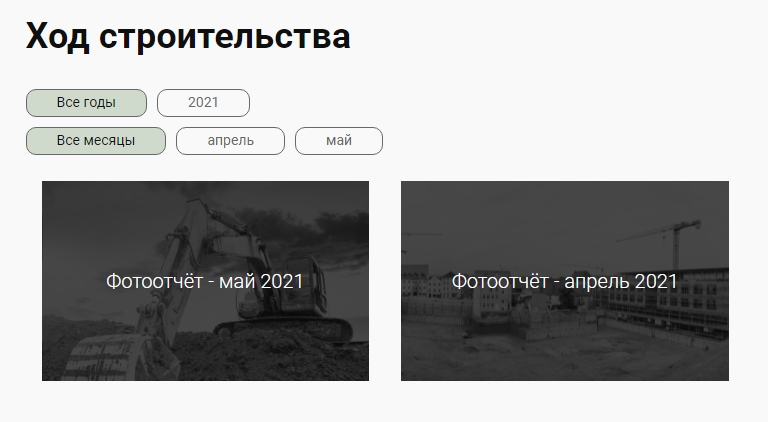
На одном из проектов, необходимо было реализовать фотогалерею по разделам. Она была реализована с помощью кастомных записей и плагина Search & Filter. Но при переводе проекта на Oxygen, плагин Search & Filter отказался работать. Поэтому переделали фильтр на основе кастомных записей и библиотеки Isotope.
<!-- more -->
Реализация фильтра записей в Oxygen
С помощью плагина Custom Post Type UI создали кастомные записи и кастомные такстономии.
Приведу сразу код который можно вставить в functions.php или сниппет.
Записи
function cptui_register_my_cpts_fotootchet() {

    /**
     * Post Type: Фотоотчёты.
     */

    $labels = [
        "name" => __( "Фотоотчёты", "twentytwentyone" ),
        "singular_name" => __( "Фотоотчёт", "twentytwentyone" ),
    ];

    $args = [
        "label" => __( "Фотоотчёты", "twentytwentyone" ),
        "labels" => $labels,
        "description" => "",
        "public" => true,
        "publicly_queryable" => true,
        "show_ui" => true,
        "show_in_rest" => true,
        "rest_base" => "",
        "rest_controller_class" => "WP_REST_Posts_Controller",
        "has_archive" => true,
        "show_in_menu" => true,
        "show_in_nav_menus" => true,
        "delete_with_user" => false,
        "exclude_from_search" => false,
        "capability_type" => "post",
        "map_meta_cap" => true,
        "hierarchical" => false,
        "rewrite" => [ "slug" => "fotootchet", "with_front" => true ],
        "query_var" => true,
        "menu_icon" => "dashicons-camera-alt",
        "supports" => [ "title", "editor", "thumbnail" ],
        "show_in_graphql" => false,
    ];

    register_post_type( "fotootchet", $args );
}

add_action( 'init', 'cptui_register_my_cpts_fotootchet' );
Таксономии
function cptui_register_my_taxes() {

    /**
     * Taxonomy: Годы.
     */

    $labels = [
        "name" => __( "Годы", "twentytwentyone" ),
        "singular_name" => __( "Год", "twentytwentyone" ),
    ];


    $args = [
        "label" => __( "Годы", "twentytwentyone" ),
        "labels" => $labels,
        "public" => true,
        "publicly_queryable" => true,
        "hierarchical" => true,
        "show_ui" => true,
        "show_in_menu" => true,
        "show_in_nav_menus" => true,
        "query_var" => true,
        "rewrite" => [ 'slug' => 'foto_year', 'with_front' => true, ],
        "show_admin_column" => false,
        "show_in_rest" => true,
        "rest_base" => "foto_year",
        "rest_controller_class" => "WP_REST_Terms_Controller",
        "show_in_quick_edit" => false,
        "show_in_graphql" => false,
    ];
    register_taxonomy( "foto_year", [ "fotootchet" ], $args );

    /**
     * Taxonomy: Месяцы.
     */

    $labels = [
        "name" => __( "Месяцы", "twentytwentyone" ),
        "singular_name" => __( "Месяц", "twentytwentyone" ),
    ];


    $args = [
        "label" => __( "Месяцы", "twentytwentyone" ),
        "labels" => $labels,
        "public" => true,
        "publicly_queryable" => true,
        "hierarchical" => true,
        "show_ui" => true,
        "show_in_menu" => true,
        "show_in_nav_menus" => true,
        "query_var" => true,
        "rewrite" => [ 'slug' => 'foto_month', 'with_front' => true, ],
        "show_admin_column" => false,
        "show_in_rest" => true,
        "rest_base" => "foto_month",
        "rest_controller_class" => "WP_REST_Terms_Controller",
        "show_in_quick_edit" => false,
        "show_in_graphql" => false,
    ];
    register_taxonomy( "foto_month", [ "fotootchet" ], $args );
}
add_action( 'init', 'cptui_register_my_taxes' );
Через плагин Code Snippets вставляем код, для того чтобы подключить библиотеку Isotope и создать шорткод самого фильтра, которые вставляется в шаблон Oxygen для этих записей.
Сам код сниппета
// Подключаеи ISOTOPE
add_action( 'wp_footer', function () { ?>
<script src="https://unpkg.com/isotope-layout@3/dist/isotope.pkgd.min.js"></script>
<script type="text/javascript">
// Инициализация Isotope
var $grid = jQuery('.oxy-posts').isotope({
  // Опции
  itemSelector: '.element-item',
  layoutMode: 'fitRows'
});

// Фильтруем по нажатию кнопок
var filters = {};
jQuery('.filter-button-group').on( 'click', 'button', function() {
  var $this = jQuery(this);
  // get group key
  var $buttonGroup = $this.parents('.button-group');
  var filterGroup = $buttonGroup.attr('data-filter-group');
  // set filter for group
  filters[ filterGroup ] = $this.attr('data-filter');
  // combine filters
  var filterValue = concatValues( filters );
  $grid.isotope({ filter: filterValue });
});

// flatten object by concatting values
function concatValues( obj ) {
  var value = '';
  for ( var prop in obj ) {
    value += obj[ prop ];
  }
  return value;
}

// Добавляем и убираем класс is-checked для активных кнопок
jQuery('.button-group').each( function( i, buttonGroup ) {
  var $buttonGroup = jQuery( buttonGroup );
  $buttonGroup.on( 'click', 'button', function( event ) {
    $buttonGroup.find('.is-checked').removeClass('is-checked');
    var $button = jQuery( event.currentTarget );
    $button.addClass('is-checked');
  });
});

jQuery('.filter-foto-button').click(function(){ jQuery('.filter-button-group .filter-foto-button:not(.is-checked)').toggleClass("default");
 });


</script>
<style>

/* Фильтр выпадашкой

    .filter-button-group .filter-foto-button.is-checked {background: #f0c114;}
    .filter-button-group {
        width: 150px;
        height: 30px;
        overflow: hidden;
        float: left;
        margin-right:20px;
    }
    .filter-button-group button {
        width: 150px;
        height: 30px;
        display: block;
    }
    .filter-button-group:hover{
        overflow: auto;
        z-index: 999999;
        height: min-content;
    }
    .filter-group {
        position: absolute;
        z-index: 1;
    }
    .filter-button-group .filter-foto-button {
        background: #f9f9f9;
        border: none;
    }
    .filter-button-group .filter-foto-button.is-checked {
        display:block;
    }
    .filter-button-group .filter-foto-button:not(.is-checked) {
        display:none;
    }
    .filter-button-group:hover .filter-foto-button:not(.is-checked),
    .filter-button-group:focus .filter-foto-button:not(.is-checked) {
        display:block;
    }
    .filter-button-group .filter-foto-button:first-child {
        background: #f9f9f9;
        border-bottom: 1px solid #999999;
        position: relative;
    }
    .filter-button-group .filter-foto-button:first-child:after {
        content: "";
        position: absolute;
        top: 10px;
        right: 0px;
        height: 15px;
        width: 15px;
        margin: 0;
        transform: translate(-50%,-50%) rotate(45deg);
        border: none;
        border-right: 1px solid #999;
        border-bottom: 1px solid #999;
    }
@media screen and (max-width: 767px) {
    .filter-button-group, .filter-button-group button  {
        width: 100px;
        font-size:12px;
    }
    .filter-button-group {
        margin-right: 10px;
    }

    .filter-button-group .filter-foto-button:first-child:after {
        height: 7px;
        width: 7px;
        top: 12px;
    }
}*/


/* фильтр кнопками */
.filter-button-group .filter-foto-button.is-checked {
    background: rgba(47,94,26,0.2);
    color:#0f0f0f;
    }
.filter-button-group .filter-foto-button {
    background: transparent;
    border: 1px solid #686868;
    color: #686868;
    border-radius: 10px;
    padding: 5px 30px;
    margin: 0 10px 10px 0;
    font-size: 14px;
    font-family: 'Roboto';
}
    .filter-button-group .filter-foto-button:hover {
        background: rgba(47,94,26,0.32);
    }
    body.single-fotootchet .ct-section-inner-wrap h1.ct-headline {
        margin-bottom: 17px;
    }

</style>
<?php } );

// Шорткод фильтра для вставки перед Easy Post
add_shortcode( 'filter-foto', function () {

    echo '<div class="filter-group">';

// Код для вывода списка кнопок с определенной таксономией

// Выводим список кнопок с домами
$args = array( 'hide_empty=0', 'orderby' => 'slug', 'order' => 'ASC' );
$terms = get_terms('foto_house', $args);
// собираем их и выводим
if ( !empty( $terms ) && !is_wp_error( $terms ) ) {
    $count = count($terms);
    $i=0;
    $term_list = '<div class="button-group filter-button-group"  data-filter-group="house"><button class="filter-foto-button is-checked" data-filter="*">Все дома</button>';
    foreach ($terms as $term) {
        $i++;
        $term_list .= '<button class="filter-foto-button" data-filter=".'. $term->slug .'">' . $term->name . '</button>';
        if ($count != $i) {
            $term_list .= '';
        }
        else {
            $term_list .= '</div>';
        }
    }
    echo $term_list;
}
// Выводим список кнопок с годами
$args = array( 'hide_empty=0', 'orderby' => 'slug', 'order' => 'ASC' );
$terms = get_terms('foto_year', $args);
// собираем их и выводим
if ( !empty( $terms ) && !is_wp_error( $terms ) ) {
    $count = count($terms);
    $i=0;
    $term_list = '<div class="button-group filter-button-group" data-filter-group="year"><button class="filter-foto-button is-checked" data-filter="*">Все годы</button>';
    foreach ($terms as $term) {
        $i++;
        $term_list .= '<button class="filter-foto-button" data-filter=".'. $term->slug .'">' . $term->name . '</button>';
        if ($count != $i) {
            $term_list .= '';
        }
        else {
            $term_list .= '</div>';
        }
    }
    echo $term_list;
}

// Выводим список кнопок с месяцами
$args = array( 'hide_empty=0', 'orderby' => 'slug', 'order' => 'ASC' );
$terms = get_terms('foto_month', $args);
// собираем их и выводим
if ( !empty( $terms ) && !is_wp_error( $terms ) ) {
    $count = count($terms);
    $i=0;
    $term_list = '<div class="button-group filter-button-group" data-filter-group="month"><button class="filter-foto-button is-checked" data-filter="*">Все месяцы</button>';
    foreach ($terms as $term) {
        $i++;
        $term_list .= '<button class="filter-foto-button" data-filter=".'. $term->slug .'">' . $term->name . '</button>';
        if ($count != $i) {
            $term_list .= '';
        }
        else {
            $term_list .= '</div>';
        }
    }
    echo $term_list;
}

// END Код для вывода списка кнопок с определенной таксономией

    echo '</div>';

} );
// END Шорткод фильтра для вставки перед Easy Post
Создаем шаблон для архива этих записей Oxygen -> Templates
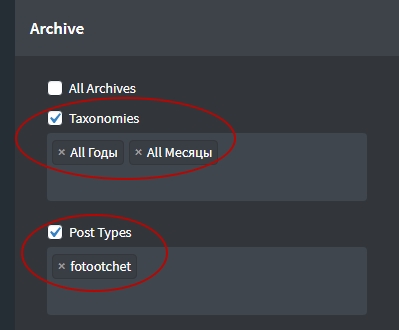
В самом шаблоне вставляем шорткод и блок Easy Posts.
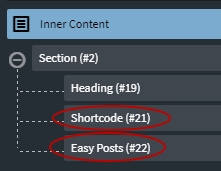
Шорткод вставляем который прописали в сниппете выше.
[filter-foto]А в блоке Easy Posts выбираем Template PHP и вставляем туда этот код:
<div class='oxy-post element-item <?php
  $cur_terms = get_the_terms( $post->ID, 'foto_year' );
    if( is_array( $cur_terms ) ){
        foreach( $cur_terms as $cur_term ){
            echo $cur_term->slug;
            echo ' ';
        }
    }

  $cur_terms = get_the_terms( $post->ID, 'foto_month' );
    if( is_array( $cur_terms ) ){
        foreach( $cur_terms as $cur_term ){
            echo $cur_term->slug;
              echo ' ';
        }
    }

  $cur_terms = get_the_terms( $post->ID, 'foto_house' );
    if( is_array( $cur_terms ) ){
        foreach( $cur_terms as $cur_term ){
            echo $cur_term->slug;
            echo ' ';
        }
    }?> '>


    <a class='oxy-post-image' href='<?php the_permalink(); ?>'>
      <div class='oxy-post-image-fixed-ratio' style='background-image: url(<?php echo get_the_post_thumbnail_url($post,'full'); ?>);'>

        <div class="foto-otchet-title">
          <div><?php the_title(); ?></div>
        </div>


      </div>

    </a>


</div>
А в блоке Easy Posts -> Template CSS вставляем этот код:
%%EPID%% .oxy-posts {
  display: flex;
  flex-direction: row;
  flex-wrap: wrap;
}

%%EPID%% .oxy-post {
  display: flex;
  flex-direction: column;
  text-align: left;
  align-items: flex-start;
  margin-bottom: 0;
  width: 33.33%;
  padding: 1em;
}

%%EPID%% .oxy-post-image {
  margin-bottom: 0;
  position: relative;
  background-color: grey;
  width: 100%;
}

%%EPID%% .oxy-post-image-fixed-ratio {
  height: 200px;
  background-size: cover;
  background-position: center center;
}

%%EPID%% .oxy-post-image-date-overlay {
  position: absolute;
  top: 1em;
  right: 1em;
  font-size: .7em;
  color: white;
  background-color: rgba(0,0,0,0.5);
  padding: .7em 1em;
  font-weight: bold;
  -webkit-font-smoothing: antialiased;
}

%%EPID%% .oxy-post-title {
  font-size: 1.5em;
  line-height: 1.2em;
}

%%EPID%% .oxy-post-meta {
  margin-top: 0.5em;
  font-size: .8em;
  display: flex;
  flex-direction: row;
}

%%EPID%% .oxy-post-meta-item::after {
    content: "\00b7";
    margin-right: .5em;
    margin-left: .5em;
}

%%EPID%% .oxy-post-meta-item:last-child::after {
    content: "";
    display: none;
}

%%EPID%% .oxy-post-content {
  margin-top: 1em;
  margin-bottom: 1em;
}

%%EPID%% .oxy-post-content p {
  margin: 0;
}
%%EPID%% .foto-otchet-title {
    width: 100%;
  height: 100%;
  background-color: rgba(0,0,0,0.7);
  display: flex;
  align-items: center;
    justify-content: center;
    color:#fff;
  font-size: 20px;
  font-weight: 300;
  -webkit-transition: all 0.8s ease;;
  -moz-transition: all 0.8s ease;;
  -o-transition: all 0.8s ease;;
  transition: all 0.8s ease;
}
%%EPID%% a:hover .foto-otchet-title {
  background-color: rgba(0,0,0,0.0);
}


@media (max-width: 1120px) {
  %%EPID%% .oxy-post-meta {
    display: none;
  }
}
В итоге получаем рубрику с фильтром для записей и кнопками. Если в сниппете закомментировать стиль для кнопок и разкомментировать стиль для выпадашек, то вместо кнопок в фильтре будут выпадашки. Но они не корректно работают на мобильном устройстве.